When to Step Outside the Connector Toolbox
- June 26, 2026
- Posted by: The Lisper
- Categories: Java, Mulesoft Anypoint Platform
Dear friends,
I recently built a data warehouse loader on the MuleSoft Anypoint Platform. It receives a ZIP file over HTTP, unzips it, splits a large XML document into individual records, and lands those records in a database. The flow is straightforward on paper: POST multipart form data, decompress, chunk, insert. But the XML input can be 500 MB or more, a single file with millions of records, and that number changes everything.
I want to walk you through the decisions that shaped this integration, because they illustrate a pattern I see more developers facing: when do you use the platform’s declarative connectors, and when do you write custom Java? The answer depends on the shape and size of your data, not on ideology. MuleSoft’s connector ecosystem is deep and well designed, but no platform can anticipate every data shape. Recognizing the moment when a standard tool becomes the wrong tool is a skill worth developing.
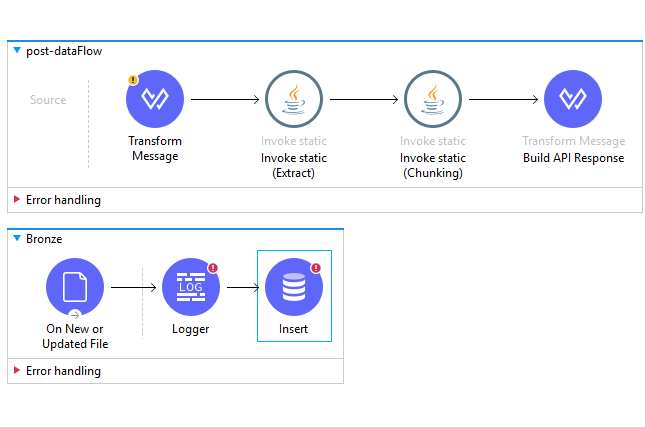
The integration follows API-led connectivity. An experience API receives the multipart request on port 8081, routed by APIKit from a RAML specification. A process API handles the extraction and chunking. A system API, which I call the Bronze flow after the medallion lakehouse pattern, polls for new files and inserts them into a database. Configuration lives in a YAML file with four directory paths: compressed input, uncompressed output, chunk staging, and a processed archive. The database connection is a Spring bean pointing at an H2 instance during development, swappable to PostgreSQL in production without touching flow logic.
I want to spend time on the RAML specification because it defines the contract that everything else must satisfy. The RAML is about 30 lines and declares a single POST endpoint at /dhw with a multipart/form-data body containing a file part. The response is HTTP 201 with a JSON body typed to a custom schema called report_results. That schema has two required fields: count, an integer for the number of records processed, and elapsed_time, a string like “140 sec”. Both fields are required. If the Java code returns only one of them, APIKit’s schema validation catches the mismatch and returns a 500 rather than propagating a malformed response to the client.
The schema-as-contract pattern is something I find undervalued. When you declare types in RAML, three things happen. The API console, APIKit’s auto-generated Swagger-like UI, shows example responses that testers can use immediately. Consumers get a machine-readable contract they can feed into client code generators. And the platform itself enforces the contract at runtime. It transforms an endpoint that happens to return JSON into an API with a defined shape. I have seen integrations where the response format drifts over months because nobody bothered to lock it down. A 30-line RAML file prevents that drift entirely.
The multipart body declaration also does real work. APIKit reads the RAML, understands that POST /dhw expects multipart/form-data with a file property, and wires the router to a Mule flow named post:\dhw:multipart\form-data:dataware-house-loader-api-config. That colon-delimited name encodes the HTTP method, resource path, content type, and APIKit config. It is verbose but deterministic: given any RAML, you can predict the flow name APIKit will expect. The scaffolding tool generates these flows, so you rarely write them by hand.
Once the request reaches the process flow, a DataWeave transform extracts the raw bytes from the first multipart part with payload.parts[0].content and passes them as an InputStream to a Java method called extract(). That method wraps the stream in a ZipInputStream, iterates through ZIP entries, and writes each one to disk. Every file path gets a .tmp suffix during the write, then renames atomically to the final filename only after the write completes. A half-written file never appears under its real name. The Bronze flow’s file listener, which polls for new XML files, never picks up an incomplete chunk. A single rename is the cheapest reliability investment in the entire pipeline.
A second DataWeave call invokes chunkify(), passing the path to the uncompressed books.xml and the output directory for chunked files. The method returns a Java Map with count and elapsed_time, which a final DataWeave transform serializes to JSON. The response flows back through APIKit, which validates it against the report_results schema, and the client receives exactly the shape the RAML promised.
Now, the chunking itself. This is where I had to step outside the connector toolbox, and I want to explain why.
DataWeave can parse XML natively with its read() function. For a small XML file, say under 50 MB, that is absolutely the right call. One line, declarative, maintainable by any team member. But read() uses a DOM parser. It loads the entire XML document into memory as an object tree. For a 500 MB XML file, the in-memory representation typically runs 4 to 10 times the raw text size, around 2 to 5 GB of heap. On a Mule runtime with a 1 GB heap, that is an instant OutOfMemoryError. The parser does not stream. It cannot stream. XML’s structure, with its namespaces, mixed content, and XPath navigation support, requires the full tree. DataWeave’s excellent streaming support for CSV and JSON does not extend to XML, and that is not a flaw in DataWeave. It is a property of the format.
I evaluated the other standard options and found the same constraint. Mule’s XML modules and Transform Message components all operate on the payload, and the payload is the entire document. The DOM parsing happens upstream, before your transform ever runs. There is no connector in Anypoint Exchange that streams a large XML file, extracts matching subtrees, and writes each to disk. The pattern simply is not common enough for the connector ecosystem to have targeted it.
This left me with the Java module, MuleSoft’s escape hatch into the JVM. And for this specific problem, the right tool inside the JVM is the StAX Cursor API.
StAX, the Streaming API for XML, is a pull parser. The word “pull” matters. SAX is push-based: it fires callbacks at your code, and you assemble state across callback invocations to track where you are in the document. For a task like “extract each <book> subtree and write it to a separate file,” SAX would bury you in a state machine: are we inside a book? Inside an author? Inside a title? Are we closing the right element? StAX gives you a cursor and a next() method. You advance when you want, inspect what you find, and decide what to do. You can pause mid-stream, capture a subtree, serialize it, and resume.
The memory profile is what makes StAX the right choice here. With a DOM parser, peak heap usage scales with file size, roughly 4x to 10x the raw bytes. With StAX, peak heap usage equals the size of one record. A single <book> element with an author name, a title, and a few attributes takes maybe 500 bytes on the heap. Process a million records? The JVM does not care. Each record is briefly allocated, then garbage collected in the young generation. The memory graph is flat. The XML file streams from disk sequentially, and the heap never grows beyond what a single record demands.
The chunkify() method opens the XML with a streaming reader and scans forward to the first <book> start element. When it finds one, a helper method called extractSubtree() takes over. It reads events one at a time, start element then characters then end element, and mirrors each through an XMLStreamWriter into a byte array. A depth counter tracks nesting: each start element increments it, each end element decrements it. When depth returns to zero after the matching </book>, the subtree is fully captured as a standalone XML string. That string passes through an identity transformer for XML declaration handling and well-formedness checking, then writes to disk as bk001.xml. The reader advances past whitespace to the next <book> and the cycle repeats until the document ends.
I chose the XMLStreamWriter to serialize each subtree rather than building XML strings manually. Manual concatenation like "<author>" + name + "</author>" is a magnet for unescaped ampersands, missing namespace declarations, and malformed output that downstream parsers reject. The streaming writer handles character escaping, namespace injection, and attribute ordering correctly. It uses the same StAX factory as the reader, keeping the entire pipeline inside a consistent API family. The identity transformer step adds almost no overhead and guarantees that every output file is a well-formed XML document with a proper declaration.
The Java module is not a design smell. It is a pressure release valve. MuleSoft’s declarative connectors cover the vast majority of integration patterns, but when your data shape demands streaming decomposition of a single enormous file into thousands of independent outputs, no declarative tool will do the job. The key is to drop into Java for exactly the operation that demands it, the XML chunking, and return to the declarative flow for everything else: file listeners, database inserts, error handling. Custom Java does not mean you abandoned the platform. It means you are using the platform with precision.
Once the chunked XML files land in the staging directory, the Bronze flow takes over. A file listener polls with a fixed frequency, using a CREATED_TIMESTAMP watermark to track which files have been processed. Each file’s content, a single <book> element, gets inserted into the database with a parameterized SQL statement. Named parameters like :author and :title prevent SQL injection and let the JDBC driver handle type coercion. After processing, files move to an archive directory rather than being deleted, preserving an audit trail for downstream reprocessing.
I named this the Bronze flow after the medallion architecture popularized by Databricks. Bronze is the raw ingestion layer where data lands exactly as it arrived. Silver would add validation, deduplication, and type coercion. Gold would produce business-level aggregates. The pattern is about data lifecycle management, not about which platform hosts it. A Mule flow with a file listener and a database insert is a Bronze layer. A DataWeave validation transform and a merge step give you Silver. Aggregation gives you Gold.
I want to leave you with a simple framework for the next time you face a similar decision. If your total XML is under 50 MB, use DataWeave’s read(). It is one line, declarative, and your team can maintain it without Java expertise. If you need complex XPath transformations that reference elements across the document, you need the DOM tree. StAX will not help. But if your data volume exceeds what in-memory parsing can handle, and the decomposition pattern is simple enough that a cursor loop stays readable, the Java module with StAX is the right answer.
Choosing your XML parser based on data volume rather than habit is a small shift that pays off every time the file size grows beyond what you expected. The platform gives you declarative tools for the common cases and an escape hatch for the uncommon ones. Knowing which case you are in is the whole job.
Keep integrating.